Automation for Bookkeeping: Streamline Your Financial Ops
Manual bookkeeping drains time and invites costly errors. Your team spends hours on data entry while financial visibility lags behind reality.
Automation for bookkeeping transforms this reality. Modern platforms eliminate repetitive tasks, reduce mistakes, and deliver real-time insights into your business finances.
This guide walks you through the tools, strategies, and implementation steps to streamline your financial operations today.
Why Manual Bookkeeping Costs You More Than You Think
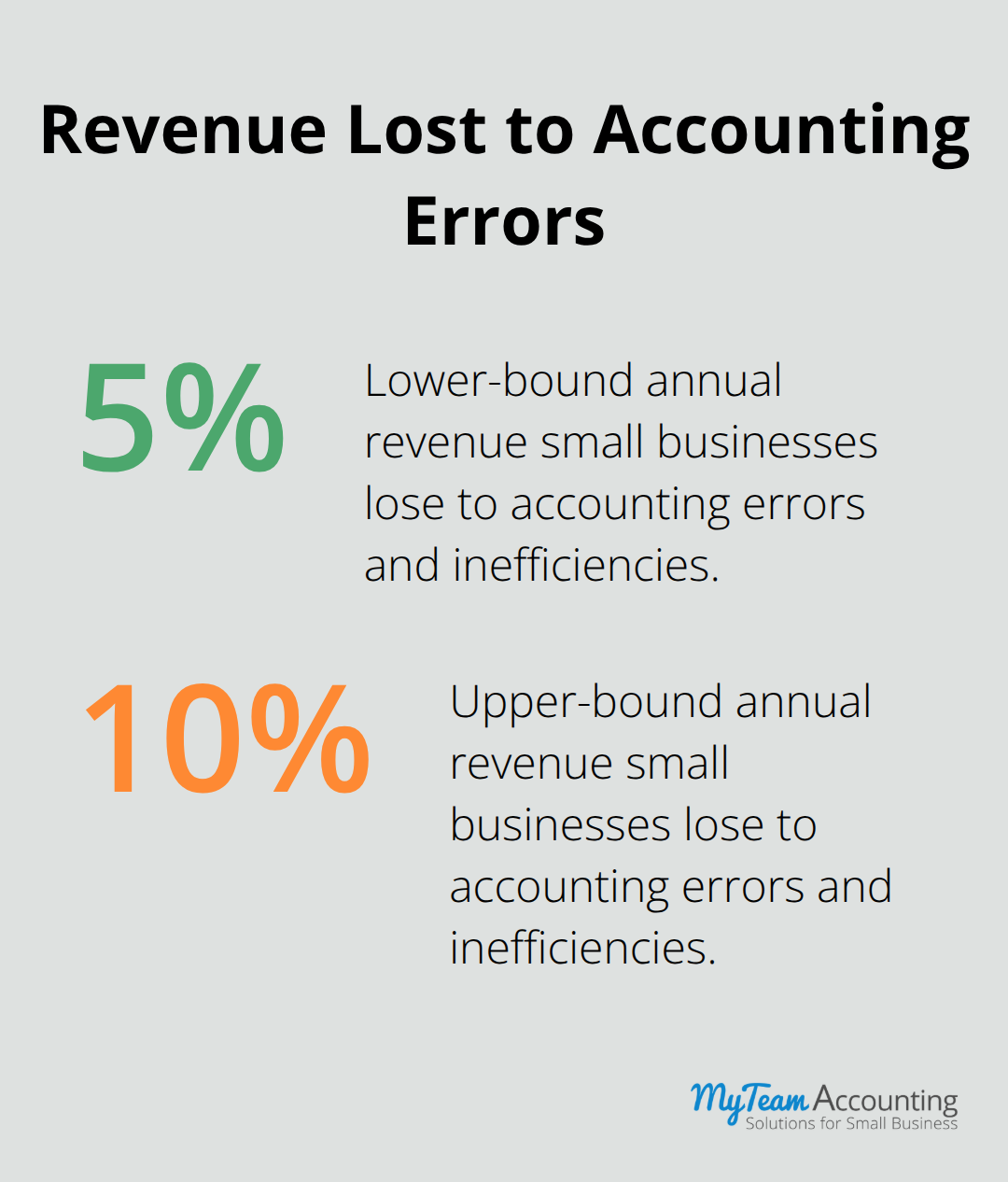
Manual bookkeeping creates a cascade of financial damage that extends far beyond wasted hours. A single data entry error triggers cascading mistakes across your financial records, making it nearly impossible to trust your year-end numbers until an accountant reconciles everything months later. Small businesses lose approximately 5 to 10 percent of revenue annually to accounting errors and inefficiencies. Your team enters the same invoice data multiple times across different systems, re-keys bank transactions, and manually categorizes expenses-work that adds zero value to your business. Meanwhile, your financial statements lag reality by weeks, leaving you unable to answer critical questions about cash flow, hiring capacity, or customer profitability until well after the accounting period closes.
The Speed-Accuracy Trap
Manual processes force you to choose between speed and accuracy, never achieving both. A bookkeeper rushing to close the month makes categorization errors that distort your profit and loss statement. A bookkeeper taking time to verify every entry delays your financial visibility until mid-month, which defeats the purpose of having current numbers. Automated systems eliminate this false choice entirely. Bank feed integration directly imports transactions from your financial institutions, automatically matching deposits and expenses to your accounts without human intervention. Expense tracking automation captures receipts in real time through mobile apps, preventing the scenario where your team discovers missing documentation during tax season.
Compliance Risk and Payroll Penalties
Payroll processing automation ensures tax calculations, withholdings, and filing deadlines happen without manual oversight. Manual payroll management exposes your business to compliance violations that cost small business owners thousands in penalties and back taxes. Automated systems handle these calculations consistently and file on schedule, removing the administrative burden from your team. This protection alone justifies the investment in modern bookkeeping platforms.
What Automation Actually Frees Your Team to Do
These tools do not replace your accountant-they free your accountant from manual work so they can analyze your numbers and provide strategic guidance instead of chasing missing receipts. Your team shifts from data entry to decision support, focusing on insights that drive business growth. This transformation positions your accounting function as a strategic asset rather than a cost center.
The right automation platform depends on your specific business structure and current systems. Understanding your pain points and selecting the appropriate tools sets the foundation for successful implementation.
Which Automation Tools Deliver Real Results for Your Bookkeeping
Bank Feeds: Your Foundation for Accurate Records
Bank feeds represent the single highest-impact automation investment you can make. Connect your business bank account directly to QuickBooks Online or Xero, and transactions flow in automatically without manual entry, eliminating the tedious work of logging every deposit and payment. The platform matches incoming transactions to existing invoices and expenses with remarkable accuracy. QuickBooks Online’s SmartMatch feature learns your categorization patterns over time, automatically sorting transactions into the correct accounts after processing just a handful of similar entries. Bank feeds keep Xero current automatically – transactions appear daily without you having to export a file, format it, and upload it.
The time savings alone justify implementation, but the real advantage emerges when you close your books in days instead of weeks. Reconciliation happens continuously rather than as a month-end scramble, transforming how quickly you access accurate financial data.
Invoice and Expense Tracking: Capture Data in Real Time
Invoice and expense tracking automation transforms how you capture financial data. Email invoices directly from the system with automatic payment reminders built in, and you reduce days sales outstanding by an average of five to seven days. Mobile expense apps like Expensify or the native receipt capture tools in QuickBooks Online and Xero let your team photograph receipts instantly, eliminating the scenario where expense reports arrive three months late with missing documentation.
The system stores receipts digitally, links them to transactions automatically, and makes everything audit-ready without additional effort. Your team no longer chases down missing documentation during tax season or struggles with disorganized expense records.
Payroll Automation: Eliminate Compliance Risk
Payroll automation removes the highest-compliance risk from your operations. Platforms like Gusto or ADP integrate directly with your accounting software, and payroll automation compliance requirements include automating tax calculations to guarantee accurate withholdings for federal and state taxes, which markedly reduces the risk of penalties. The integration between payroll and accounting systems ensures your labor costs flow into the correct expense accounts automatically, eliminating the manual journal entries that typically introduce errors during month-end close.
This seamless connection between systems sets the stage for implementing these tools across your entire operation.
Moving from Manual to Automated Bookkeeping
Identify Your Current Pain Points
Start your automation journey with a clear assessment of where your current process fails. Open your accounting software and measure how long it takes to close the books each month-most small businesses waste significant time monthly on manual data entry and reconciliation alone. Interview your bookkeeper or accounting team about their biggest frustrations: Are they chasing down missing receipts? Spending entire days on bank reconciliation? Re-entering the same invoice data across multiple systems? These pain points reveal which automation features will deliver the highest impact for your business.
Moving from manual to automated bookkeeping can save significant time monthly after implementing bank feeds, while similar gains are achievable when combining bank feeds and automated invoice reminders. This financial reality makes your automation business case undeniable.
Match Your Business Structure to Platform Capabilities
Selecting the right platform requires matching your business structure to software capabilities rather than choosing based on brand reputation alone. A service-based business with simple revenue streams and minimal inventory needs different features than a retail operation managing stock across multiple locations. If you run payroll in-house, prioritize platforms with native payroll integration or confirmed third-party connections to your payroll provider-switching between disconnected systems defeats automation’s purpose entirely.
QuickBooks Online suits businesses needing broad app integrations and straightforward workflows, while Xero excels for companies requiring multi-currency support or more granular permission controls. A certified QuickBooks ProAdvisor or Silver Xero Partner can audit your current systems and recommend the platform that eliminates your specific pain points rather than forcing you into unnecessary features.
Implement Core Features First, Then Expand
Once selected, resist the temptation to configure every possible setting before going live. Implement core features like bank feeds and automatic categorization first, then add complexity after your team masters the fundamentals. This phased approach prevents overwhelming your staff and ensures each feature delivers measurable value before you introduce the next layer of automation.
Train Your Team Through Hands-On Practice
Training happens most effectively through hands-on practice with real transactions rather than classroom-style instruction. Assign one team member as the platform champion who becomes deeply proficient, then have them guide colleagues through workflows using actual company data. Most accounting software vendors offer free onboarding sessions and recorded training libraries-use these resources aggressively rather than learning through trial and error. Your team’s adoption speed determines whether automation delivers promised time savings or becomes an underutilized tool that creates additional work during the transition period.
Final Thoughts
Automation for bookkeeping eliminates the friction that slows your financial operations and introduces errors into your records. Implementing bank feeds, expense tracking, and payroll automation reclaims dozens of hours monthly that your team currently wastes on manual data entry and reconciliation. These hours translate directly into cost savings and freed capacity for strategic work that actually moves your business forward.
Reduced compliance risk from automated payroll processing protects you from costly penalties, while faster month-end closes give you real-time visibility into cash flow and profitability. Your team shifts from chasing receipts and reconciling accounts to analyzing trends and identifying growth opportunities. Over three to five years, these compounding advantages create a significant competitive edge against businesses still managing finances manually.
Start your automation journey by identifying your highest-impact pain points, then select a platform that addresses those specific challenges. A certified accounting software advisor can guide your selection and implementation process, ensuring you avoid costly mistakes and maximize your investment. Schedule a platform demonstration today and assess how automation fits your current workflows.